Deactivating the built-in refactoring features in the IDE
RAD Studio ships with built-in refactoring features, however, it is well known the current version (As of writing, 11.3) of the tools have trouble grokking newer code constructs and often they get in the way instead.
Thankfully, you can easily deactivate the refactoring features if you have a preference for a different tool (For instance, MMX Code Explorer).
To deactivate the built-in Refactoring features, do the following:
- Close all instances of RAD Studio and make sure there aren't any lingering instances in Windows Task Manager
- Open the registry editor.
- Navigate to HKEY_CURRENT_USER\SOFTWARE\Embarcadero\BDS\[Version Number]\Known IDE Packages
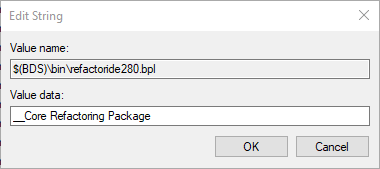
- Find the entry $(BDS)\bin\refactoride[LibSuffix].bpl
- Right click on the entry and select Modify
- In the Value Data field, prepend the content with two underscores as shown below and click OK
- You have now disabled the built-in refactoring features.
The [Version Number] corresponds to the release you have installed, for instance 11.x Alexandria uses the 22.0 version number tag.
The [LibSuffix] tag corresponds to the suffix tag applied to packages in a major IDE version and subsequent binary compatible point releases. In 11.x Alexandria, 280 is used as the suffix.